
Guide
What is calendar-based budgeting?
It starts with a simple fact: some transactions have due dates, and due dates go on calendars.
Definition
Calendar-based budgeting is a method for managing household finances by scheduling paychecks and bills on a calendar, setting money aside for special things, and calculating a weekly spending target for variable expenses.
How calendar-based budgeting works
Calendar-based budgeting has three steps:
- Schedule your commitments
- Set aside money in funds
- Spend what's left on everything else
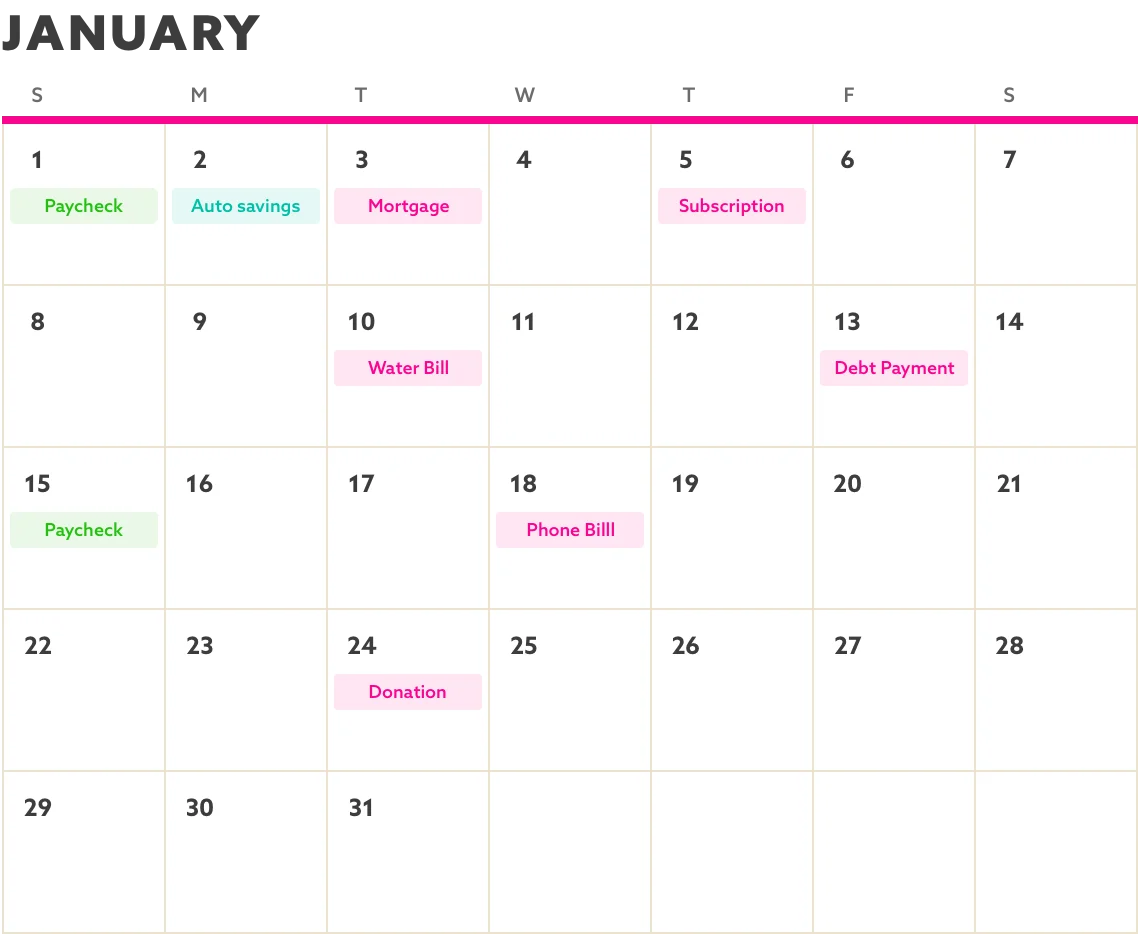
Step 1: Schedule your commitments on the calendar
The first step is placing every financial commitment on a calendar. This includes recurring expenses like rent, subscriptions, memberships, and utilities. It also includes recurring income like your paycheck and any scheduled transfers.
Everything with a known date gets scheduled.
Step 2: Set money aside in funds
With your planned income and fixed expenses on the calendar, you can then see the totals for the year and exactly how much is left. The next step is to create funds to hold money for your spending goals.
A fund is like a virtual savings account that you can add money to and spend from. You can create funds for things like vacations, home improvements, celebrations, or an expensive new item.
Enter your desired amount for each fund, and money will automatically get set aside each month to move you toward your goal.
Pay yourself first by setting aside money in funds.
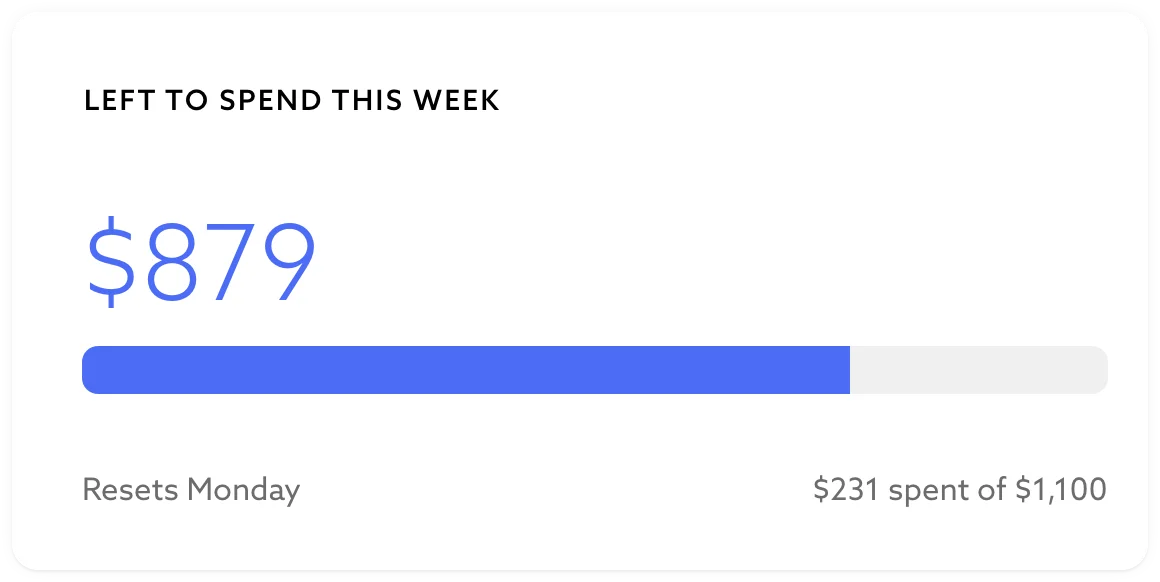
Step 3: Spend to your weekly spending target
With all your fixed expenses accounted for and money set aside for your goals, what's left is for discretionary spending, or simply "everything else". This means normal variable expenses like groceries, gas, and clothes.
Using a simple average calculation, you get a single weekly spending target for all these discretionary purchases. This broad discretionary category allows you to flexibly cut back or splurge on whatever you value that week.
If you spend under this one number each week, you're good.
Why it's easier to stick with
Calendar-based budgeting puts your mind at ease, because all your financial decisions are organized on your calendar with money automatically set aside for them. You then get the freedom to decide how best to use what's left on a weekly cadence.
The result is a system that is low on maintenance and high on visibility.
How Tend runs calendar-based budgeting
You can run the calendar-based budgeting method on a spreadsheet if you want. It boils down to recurring events on a calendar, simple calculations, and a short list of categories.
However, Tend is the app built to run it for you. It includes a calendar for all your commitments, tracks the balances of your funds, connects with all your banks, and shows exactly how much you can spend this week.
For the step-by-step version, see how Tend works.
How calendar-based budgeting differs from zero-based budgeting
Zero-based budgeting and calendar-based budgeting start from the same insight: every dollar should have a job. But they disagree on three things:
- who does the work of assigning those dollars,
- how the categories are chosen,
- and when the budget period resets.
Who gives each dollar its job
Zero-based budgeting, the method behind YNAB, EveryDollar, and most of the major budgeting apps, asks you to build a set of categories yourself and, at the start of each month, assign only the money actually sitting in your bank to those categories.
Calendar-based budgeting asks you to schedule all your financial commitments one time. Each budget period, which can be any length of time and not just a month, queries the calendar to see what's due and sets aside the money automatically. It even looks ahead for irregular expenses and starts setting aside money early, so the cash is there when they come due — like an automatic sinking fund.
How categories are chosen
With zero-based budgeting, you create as many categories as you want. You have to decide how granular to get and learn by trial and error what works best for you.
Calendar-based budgeting makes that decision for you. It provides about a dozen broad categories, so that you can get excellent visibility into your spending habits without getting bogged down with too many details. You can get more detailed tracking by tagging transactions, but it's optional. Most importantly, you never have to build the category taxonomy.
When your budget resets
Zero-based budgeting has a budget cycle that starts and ends on the first of the month. If your pay cycle doesn't match that, you end up assigning money to some categories and waiting for your next paycheck to assign the rest.
With calendar-based budgeting, the budget period is shaped around you. Most people match it to their pay cycle, weekly, every other week, or the third Wednesday of the month, so the budget resets right when the money lands. If a different rhythm fits your life better, you define that instead.
And while your budget period might be monthly, calendar-based budgeting still divides your discretionary money into weekly targets, because a week is a much more manageable stretch to review than a full 31 days.
When zero-based budgeting is best
Zero-based is the better choice for households that genuinely want granular category-specific budgets and believe they need this high-touch discipline to help change their spending habits.
Who calendar-based budgeting fits best
It works for most households, and for a few it fits especially well:
- Households with predictable income: W-2 earners, salaried workers, retirees on a fixed income, and anyone whose paycheck pattern is steady month to month.
- People who have tried YNAB, Monarch, or other zero-based methods and want that visibility into their finances without the upkeep.
- Couples and households that want a single number to guide their discretionary spending instead of 30 categories with arbitrary limits.
- People who already do this on a spreadsheet but wish it were connected to their bank.
Common questions
Is calendar-based budgeting the same as envelope budgeting?
No, but they do share some overlap. Envelope budgeting, the method behind GoodBudget and the older Dave Ramsey tradition, gives each category a fixed amount at the start of the month and asks you to stop spending in a category once its envelope is empty. Calendar-based budgeting, though, distinguishes between commitments and funds. Commitments are scheduled once, and money for them is set aside automatically every budget cycle. They are like smart envelopes. You can then assign what's left to one or more funds, which are like traditional envelopes. Finally, and this is what makes the method sustainable, you get a single discretionary fund for everything else, so you don't need to make hyper-specific categories that serve no purpose other than making your budget more difficult to manage.
Do I need an app to do calendar-based budgeting?
Technically, no. You can run the method with a spreadsheet, or with a physical calendar and graph paper. Practically, an app helps: it does the calculations, syncs with your bank, and reconciles reality with your plan. But the method predates the software.
How does calendar-based budgeting handle categories?
With a small, fixed set, chosen for you rather than designed by you. The methodology's argument is that your job is to spend deliberately inside a curated structure, not to build and maintain a taxonomy of overly specific categories. The full set, and the definitions, live on the features page.
What if I want to track something specific like dining out?
Dining out usually goes in the discretionary category, but Tend lets you tag transactions with any label you want. By tagging your transactions, you can easily view a report showing your total spending on dining out, or on anything else you'd like, over a period of time.
How does it handle big one-time expenses?
Big one-time expenses get categorized as "Special" and come out of your Special fund. You can even create multiple special funds for things like home improvements, celebrations, vacations, or anything else you'd like to save for.
Can I use calendar-based budgeting if my income is irregular?
With caveats. The method works best when income is predictable enough that scheduled commitments can be reliably funded. Variable-income households can adapt it by adding a stabilization layer, a buffer account that smooths income into a predictable monthly draw before the calendar runs, but that adaptation is yours, not a feature of the methodology.
Where did the methodology come from?
Calendar-based budgeting as a software method was named and developed at Tend. Its underlying ideas have older roots: the Japanese Kakeibo tradition (1904, a household-finance journaling practice), the academic distinction between fixed and variable costs, and the habit most thoughtful households arrive at on their own when they sit down with a calendar and a list of bills. Tend's contribution is naming the method, building it as software, and pairing it with a curated category structure.
What it feels like to budget this way
If you've tried zero-based budgeting, it probably started off great, but over time the maintenance required caused you to burn out. The familiar feelings include:
- Feast at the start of the month, famine at the end
- Confusion about how to organize your categories
- Worry that you are forgetting some critical category
- Tedium from re-allocating the same fixed expense amounts every month
- Frustration that your budget feels like a second job
How do you feel when you know exactly what you can spend this week, updated as you spend, with the rest of your commitments accounted for and your funds growing automatically? Calm, confident, and free to focus on the other important areas of your life.
Calendar-based budgeting is the method underneath Tend, the app built to run it.